



AIFS on Modal#
aifs-modal is a Python library for running serverless AIFS weather forecasts on Modal. Only the AIFS inference step runs on a Modal GPU: initial conditions ingestion, post-processing, and visualization all run locally without a GPU. Forecast outputs are stored in Icechunk repositories on S3-compatible object storage (or Earthmover ArrayLake), giving them a git-like version history you can open with xarray from anywhere.
Features#
Three forecast modes: deterministic (AIFS-Single), sequential ensemble (AIFS-ENS, one GPU), and parallel ensemble (one GPU per member using cooperative distributed writes).
Versioned array storage via Icechunk: forecast outputs are stored with git-like branching and commit history, so you can reproduce any past run and safely extend ensemble experiments. All storage backends supported by Icechunk are available (Tigris, AWS S3, Cloudflare R2, Google Cloud Storage, Azure Blob Storage, Earthmover ArrayLake).
Task-based pipeline: the ingestion of initial conditions and forecast inference are framed as steps of a computational pipeline, so they are skipped if its outputs already exist. Therefore, re-running a notebook cell never duplicates work or wastes GPU resources.
Reproducible ensembles: each member is seeded by its index (
torch.manual_seed(member_id)), so you can safely extend an ensemble run later by increasingn_members.
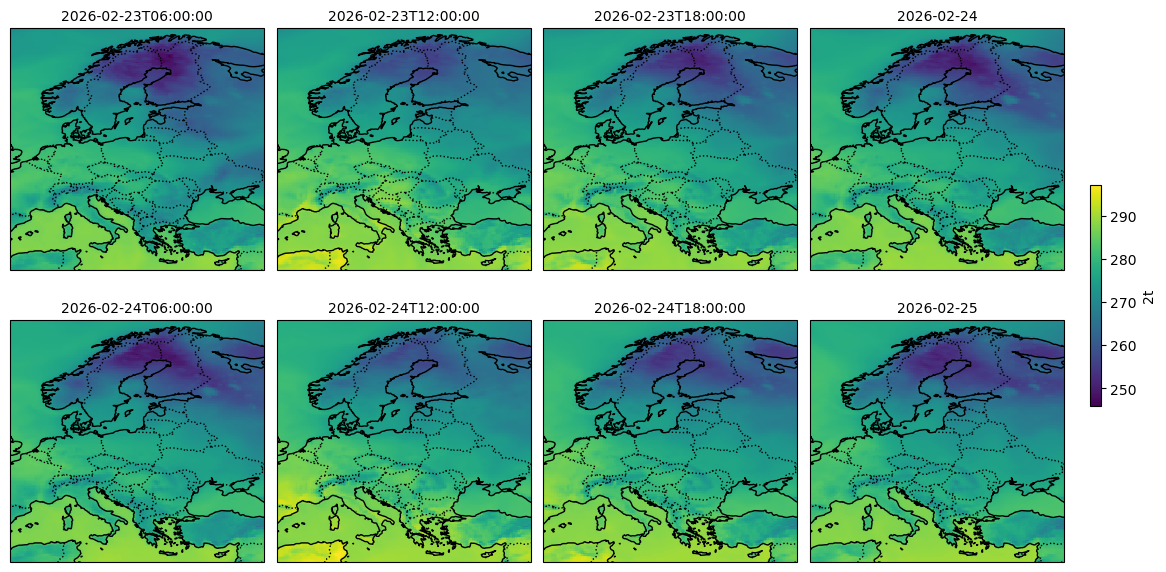 AIFS-Single deterministic 96-hour forecast of 2-meter temperature over Europe.
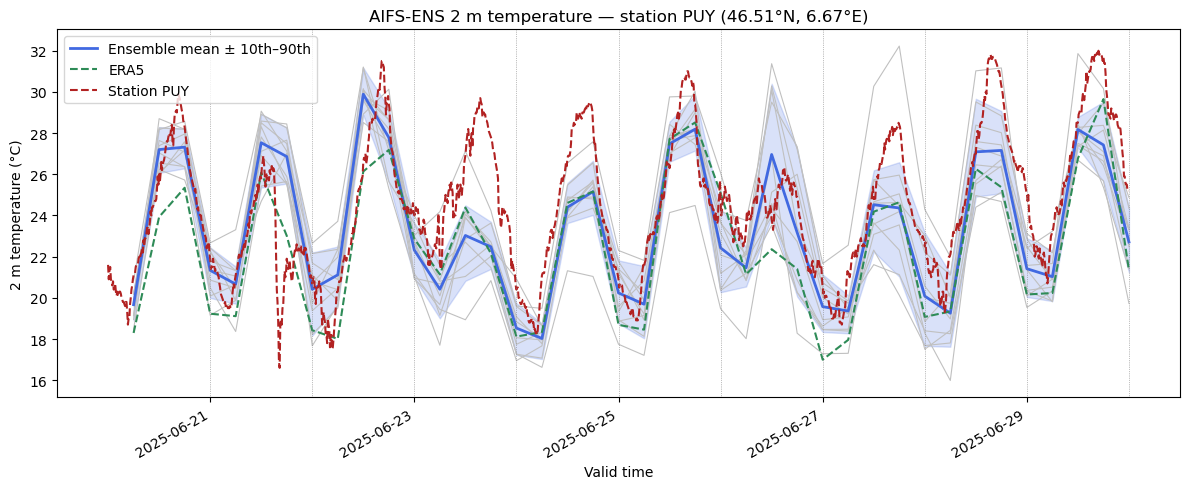 AIFS-ENS 10-member ensemble forecast of 2-meter temperature for Lausanne, verified against MeteoSwiss station data.
Usage#
import datetime

import icechunk
import xarray as xr

from aifs_modal._app import app, run_forecast
from aifs_modal import ingest

date = datetime.datetime(2025, 6, 20, 0, tzinfo=datetime.UTC)
storage_bucket = "my-bucket"

# 1. Ingest initial conditions from ECMWF Open Data (local, CPU)
ingest.ingest(
    date.isoformat(),
    date.isoformat(),
    storage_bucket,
    initial_conditions_prefix="aifs-ics",
)

# 2. Run a 96-hour forecast on Modal (GPU, ~$0.05)
with app.run():
    run_forecast.remote(
        date,
        storage_bucket,
        initial_conditions_prefix="aifs-ics",
        outputs_prefix="aifs-outputs",
        lead_time=96,
    )

# 3. Open the results locally with xarray
repo = icechunk.Repository.open(...)
ds = xr.open_dataset(
    repo.readonly_session("main").store,
    group="2025-06-20/00z",
    engine="zarr",
    zarr_format=3,
)
ds
<xarray.Dataset>
Dimensions:     (valid_time: 16, lat: 721, lon: 1440)
Coordinates:
  * valid_time  (valid_time) datetime64[ns] 2025-06-20T06:00:00 ... 2025-06-24T00:00:00
  * lat         (lat) float64 90.0 89.75 89.5 ... -89.75 -90.0
  * lon         (lon) float64 0.0 0.25 0.5 ... 359.5 359.75
Data variables:
    10u         (valid_time, lat, lon) float32 ...
    10v         (valid_time, lat, lon) float32 ...
    2d          (valid_time, lat, lon) float32 ...
    2t          (valid_time, lat, lon) float32 ...
    msl         (valid_time, lat, lon) float32 ...
    skt         (valid_time, lat, lon) float32 ...
    sp          (valid_time, lat, lon) float32 ...
    tcw         (valid_time, lat, lon) float32 ...
    ...
See the user guide for more example applications (heatwave reforecasting, jet-stream free runs).
Requirements#
A Modal account. The Starter plan gives you $30/month in free credits — a 96-hour forecast costs roughly $0.05, so that’s about 600 forecasts for free.
An object-storage bucket for Icechunk outputs. Tigris is the recommended default: the free tier includes 5 GB/month.
Installation#
pip install aifs-modal
Development#
Install pixi and use the generated environments and tasks:
pixi install -e dev
pixi run -e test test
pixi run -e doc build-doc
Commit the generated pixi.lock file once you have resolved the environments for your project, and update it whenever dependencies change.
Acknowledgements#
This package was created with the martibosch/cookiecutter-pypixi-package project template.